
How to Cancel Bean Box: My Tested Steps
·
- Prices checked Nov 19, 2026
Verdict: Cancelling took me a short, clear path: Manage Your Coffee Plan, then Cancel Coffee Plan, then “Cancel my coffee plan.” Bean Box listed five other options first, such as “Skip or pause deliveries” and “Lower the cost,” but I could pass on them, and I didn’t have to call or chat with anyone. Bean Box’s cancel FAQ says to cancel before 1 PM Pacific on the Wednesday before your box ships to avoid the next charge.
The steps at a glance
| Step | What you’ll see | Screenshot |
|---|---|---|
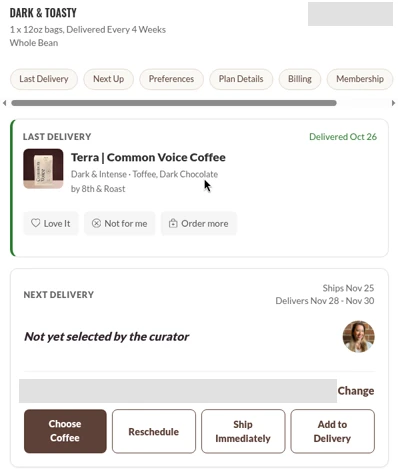
| 1. Sign in and open your plan | Your Coffee Plan page (Bean Box calls it Manage Your Coffee Plan), with your next delivery and buttons like Reschedule | Screenshot 1 below |
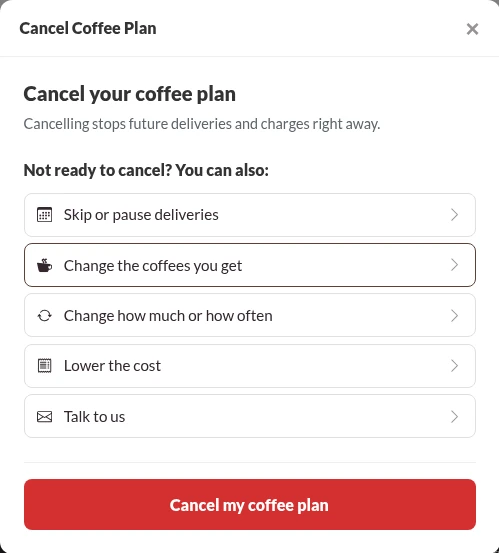
| 2. Select Cancel Coffee Plan | Bean Box’s help center says it’s at the bottom of the plan page. A window opens with five other options listed first | Screenshot 2 below |
| 3. Select “Cancel my coffee plan” | The red button at the bottom of the same window, which I used after passing on the other options | Screenshot 2 below |
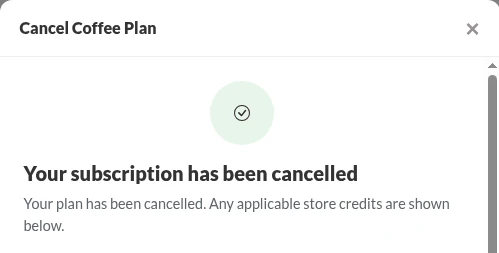
| 4. Read the confirmation | “Your subscription has been cancelled,” then a discount code and a short optional survey | Screenshot 3 below |
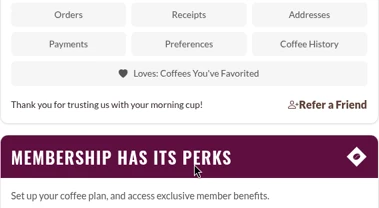
| 5. Check your account | My account page listed no coffee plan afterwards | Screenshot 4 below |
| Pause or skip instead | Reschedule, Skip Deliveries, Ship Immediately and Add to Delivery on the Coffee Plan page. From Bean Box’s help pages, not tested | None |
How to cancel (tested)
This is exactly what I did on Nov 17, 2026. My plan was Dark & Toasty, one 12 oz bag every 4 weeks, and it was the only plan on my account.
- I signed in to Bean Box and opened my coffee plan. Bean Box’s help center calls this page Manage Your Coffee Plan.
- I selected Cancel Coffee Plan. Bean Box’s help center says it’s at the bottom of the plan page and to “follow the prompts.”
- A cancel window opened with five other options listed above the red cancel button. I passed on them and selected Cancel my coffee plan.
- The window then said “Your subscription has been cancelled.”
The button label and the options in step 3 are what I saw on my own account. Bean Box’s help center doesn’t list them.
Screenshot 1: my plan page before I cancelled. I’ve covered my name, my city and an account status label.
The offers you’ll see before you cancel
When I selected Cancel Coffee Plan, a window headed “Cancel your coffee plan” listed these options under “Not ready to cancel? You can also:”:
- Skip or pause deliveries
- Change the coffees you get
- Change how much or how often
- Lower the cost
- Talk to us
Below them was a red Cancel my coffee plan button.
Screenshot 2: the cancel window (steps 2 and 3), cropped to the window itself.
I didn’t choose any of them, so I can’t tell you what each one leads to. If you only need a break, see Bean Box’s skip and reschedule options below.
How to pause or skip instead (from Bean Box’s help pages, not tested)
I didn’t test any of this. It’s what Bean Box’s help pages say (checked Nov 19, 2026).
From your Coffee Plan page, Bean Box says you can:
- Reschedule: move your next delivery to a later date.
- Skip Deliveries: “skip a delivery or two and pick up where you left off.”
- Ship Immediately: have your next delivery sent on the earliest available date.
- Add to Delivery: add extra bags to the delivery that’s coming.
Bean Box says “There’s no fee to skip or reschedule.” Its help pages don’t list a separate pause option, a maximum pause length or a limit on skips. The same help center says Plan Details lets you change your roast profile, grind, bag size or how often coffee arrives.
My own plan page did show Reschedule, Ship Immediately and Add to Delivery buttons (screenshot 1), but I didn’t use them.
The cutoff
Bean Box’s pages don’t all give the same time (all checked Nov 19, 2026):
- Its cancel FAQ and its skip FAQ say to make the change before 1 PM Pacific on the Wednesday before the delivery ships.
- Its subscription policy says cancellations received before 1 PM PST on the Wednesday before a scheduled shipment get no further charges.
- Its billing FAQ says billing happens after 5 PM PST on the Wednesday before your next delivery ships.
Go by the earlier time: 1 PM Pacific on the Wednesday before your next shipment. Bean Box’s cancel FAQ says a delivery that has already been charged will still ship.
What happens after you cancel
Right after I selected “Cancel my coffee plan,” the window said “Your subscription has been cancelled.” Below that, Bean Box offered a discount code for a future order and a short optional survey asking why I was leaving. I’m not sharing the code.
Screenshot 3: the confirmation. I’ve cropped out the discount code.
After that, my account page listed no coffee plan (screenshot 4).
Screenshot 4: my account page afterwards, with no coffee plan listed. I’ve cropped out my name and account details.
I saw only the on-screen confirmation. Bean Box’s help pages don’t say whether it sends a cancellation email.
If you get stuck
Bean Box’s contact page lists these (checked Nov 19, 2026):
- Email:
delight@beanbox.com - Phone: +1-888-923-8596
- Live chat on its site
Its subscription policy also says you can cancel by email, by a toll-free phone call, by mail, or by logging in to your account.
If you’d rather keep a subscription
If price is the reason, Bean Box’s plan page lists its 12 oz Solo Sipper plan at $19.50 a bag at every delivery frequency, and its shipping FAQ says subscription deliveries have “their own flat shipping rate” without stating the amount (both checked Nov 19, 2026).
If you want to compare other options first:
- My Bean Box review, with what arrived and how it tasted to me
- Atlas Coffee Club vs Bean Box
- Purity Coffee vs Bean Box
- Volcanica vs Bean Box
- Bean Box vs Trade
- Our best coffee subscriptions guide
- This week’s coffee subscription deals
- If you’re shopping for someone else, our coffee subscription gifts under $50
FAQ
How do I cancel Bean Box? Sign in, open your coffee plan (Manage Your Coffee Plan), select Cancel Coffee Plan, then select “Cancel my coffee plan.” That’s what I did on Nov 17, 2026.
What’s the deadline to cancel before my next box? Cancel before 1 PM Pacific on the Wednesday before your next delivery ships. Bean Box’s cancel FAQ, skip FAQ and subscription policy say 1 PM; its billing FAQ says billing happens after 5 PM PST that Wednesday. Go by the earlier time (checked Nov 19, 2026).
Can I pause Bean Box instead of cancelling? Bean Box’s help pages say you can reschedule your next delivery or skip “a delivery or two” from your Coffee Plan page, with no fee to skip or reschedule. They don’t list a separate pause option. I didn’t test this.
Does Bean Box show other options before you cancel? Yes. Its cancel window listed “Skip or pause deliveries,” “Change the coffees you get,” “Change how much or how often,” “Lower the cost” and “Talk to us” above the cancel button. I passed on them and selected “Cancel my coffee plan.”
Does Bean Box send a cancellation email? Bean Box’s help pages don’t say. I saw only the on-screen confirmation, “Your subscription has been cancelled.”
Do you earn anything from the Bean Box links on this page? No. I don’t have an affiliate deal with Bean Box, so these links earn me nothing. See our affiliate disclosure.